Backup Assistant
Automatically back up files when you open them and before you modify them.
Other time-saving features added to Microsoft Excel.
The following is the Other Assistants menu that appears when you click on the Other Assistants button. Any of the features can be added to Excel’s quick access toolbar for instant use any time.
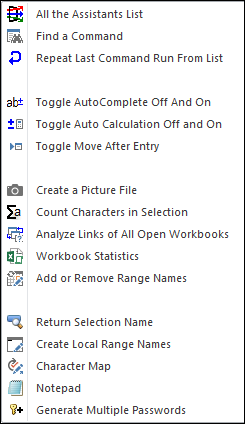
If you are having trouble finding a particular feature in the Spreadsheet Assistant, then use the All the Assistants List. The very first item on it is a Find an Assistant feature!
Sometimes we love having Auto Complete on. Sometimes we love having it off. And it’s painful to try and remember where it is among all of Excel’s options. So we added an easy-to-find menu item to toggle it off and on. And we decided toggling features off and on was so useful, we added menu items that toggle calculation and move after entry off and on.
In Excel there are two types of range names: local and global. Creating global names is pretty easy. Creating local names tied to a single worksheet is pretty painful. So, we added a way to create local range names.
Return to the Spreadsheet Assistant overview to explore all the other assistant menus.
Automatically back up files when you open them and before you modify them.
Create your own toolbar of buttons to quickly format cells and rows.
Quickly find and go to any column via a descriptive list of all columns.
See a list of the past 100 files you have opened and easily re-open any.
Move from sheet to sheet with ease. View all your sheets with one click.
Extract rows of data into columns for easy review and printing.