Row to Column Viewer
View all the data on a row at one time, with column titles. And in alphabetical title order!
An add-in for Microsoft Excel that helps you move around worksheets with many columns.
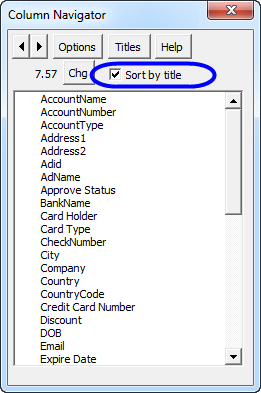
The Column Navigator add-in for Microsoft Excel helps you easily move around on worksheets that have many columns and saves you time.
With just a click of the Column Navigator button (on the Time Saver's tab), a dialog appears that lists all the columns in your worksheet. You can have the Column Navigator show the columns in actual order or sorted by title in A-Z order.
To go to any column, click on the column description. To change worksheets, click on the spin buttons on the upper left of the dialog. The “titles” button allows you to change the title rows to any rows you want. Multiple rows can be used as the column title rows. Once changed, the Column Navigator will remember the rows.
View all the data on a row at one time, with column titles. And in alphabetical title order!
Move from sheet to sheet with great ease. View a list of all your sheets with one click.
Add over 200 time-saving features to Excel.