CSV File Creator
Create CSV files the easy way, without warning messages.
An add-in for Microsoft Excel that prints all the worksheets in multiple workbooks at one time.
The Workbook Print Assistant add-in for Microsoft Excel will quickly and easily print all the worksheets in multiple workbooks at one time. Or you can use it to selectively print worksheets in many different workbooks — workbooks are opened and closed as needed.
“I re-downloaded the Workbook Print Assistant and tested it. It seems to be working just fine. I appreciate your quick response to my specific printing needs. You don’t know how much time this add-in will save me and my staff. You just may be my new best friend.” — Theresa Sholl
The following is the main dialog of the Workbook Print Assistant:
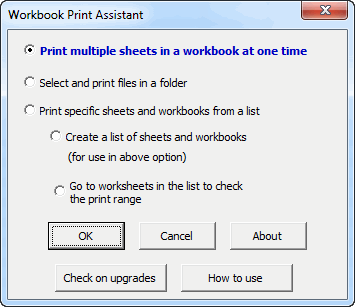
Select the option you want to do all your printing quickly and easily.


Create CSV files the easy way, without warning messages.
Eliminate tedious manual cleaning of data.
Quickly find and remove duplicates in one list or between two lists.
Import ASCII or text files with over a million lines.