Spreadsheet Assistant
Add over 200 time-saving features to Excel.
An add-in for Microsoft Excel that makes working with pivot tables far easier.
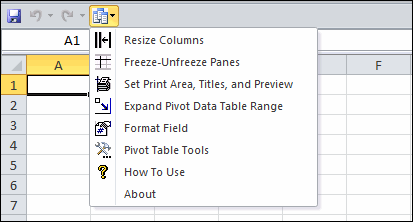
The Pivot Table Assistant add-in for Microsoft Excel takes only seconds to install and makes working with pivot tables far easier.
The Pivot Table Assistant is designed to save you time when you work with Microsoft Excel pivot tables. It adds a set of buttons, any of which can be added to Excel's quick access toolbar.
The resize columns feature will resize the columns in a pivot table so that extremely wide columns are displayed in a compressed format. The normal Excel default is to make the columns as wide as the text, which makes it difficult to see a table that has long text entries.
The expand a pivot table data range feature makes it easy to check and modify the data range of a pivot table. Whenever you add data to a pivot table, you will find out very quickly that expanding the data range is not an easy task.
The Format Fields feature lets you format pivot table data fields with format settings that stay persistent and do not reset when the table is changed.
The Pivot Table Tools menu option gives you additional helpful features:
Add over 200 time-saving features to Excel.
Clean and standardize spreadsheet data.