Spreadsheet Assistant
Add over 200 time saving features to Excel.
An add-in for Microsoft Excel that helps you build and manage lists.
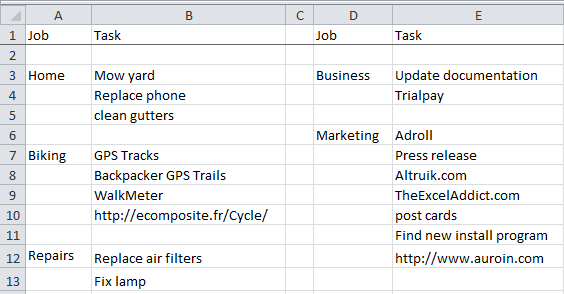
The List Assistant add-in for Microsoft Excel is a feature-rich way to manage your to do lists. It allows you to construct to do worksheets that are exactly the way you want them — you can completely customize your to do list worksheets.
The to do list worksheets can be kept in any file and/or in workbooks dedicated to to do lists. You can have as many to do worksheets and to do workbooks as you want.
The extract color cells feature is one of our newest and most useful. We often have multiple to do lists and are constantly going to each list trying to decide what to work on. Each list has the top priority jobs color coded, but they were spread across different sheets. This feature automates pulling them together, checks whether an extracted cell is already in the list to avoid duplicates, and crosses through entries that are no longer present so you know they were done or changed.
The last feature we added makes getting to do lists easy: it automatically opens your default to do workbook whenever Excel opens, so you always see your to do workbook — making it difficult to avoid looking at what you need to do!
The dropdown menus that come with the List Assistant make it easy to manage your lists:

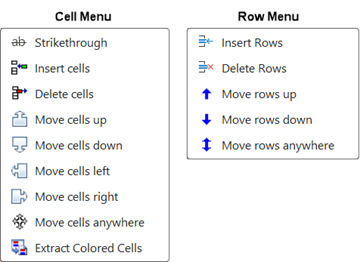
Our favorite use of the List Assistant is to manage our to-do lists. We have jobs and tasks across several columns in Excel and frequently move cells up or down or insert or delete cells. The List Assistant buttons to move cells or insert and delete cells make this easy to do.
Add over 200 time saving features to Excel.
Shift and rearrange words within cells.