Compare Columns Assistant

An add-in for Microsoft Excel that compares columns to find differences.

Download a trial version now!

  • Compare columns between lists
  • Compare columns in a list
  • Color differences if both are in the same list
  • Copy differences from one list to the other when comparing different lists
  • Lists do not have to be in the same worksheet or workbook
  • Lists do not have to be sorted

The Compare Columns Assistant add-in for Microsoft Excel makes comparing columns in Microsoft Excel worksheets easy. It can compare columns in a list or columns between lists.

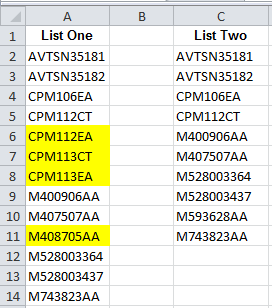
The following illustrates comparing two lists to find the entries in the first list that are not in the second list:
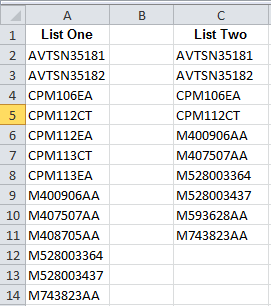
Compare columns before
Before
Compare columns after
After - yellow cells are cells in list one that are not in list two

The Compare Columns Assistant can:

  • Compare lists that are in different worksheets or different workbooks — lists do not have to be in the same worksheet or workbook
  • Lists do not have to be sorted
  • Identify entries that are either in both lists or are in one list and not in the other
  • Compare data in rows you have already matched up to see what is the same or different
  • Color, copy or insert an entry in a column when a matching (or non-matching) entry is found
  • Delete entries when a matching (or non-matching) entry is found, versus coloring or marking

The following illustrates comparing data from two months to find differences. This comparison is a row-by-row comparison.
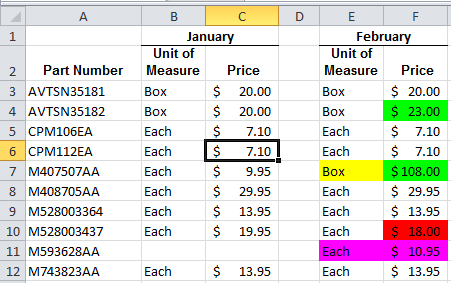
Compare columns row by row

In the above, if the values go up for a part number, they are colored green. If they go down, they are colored red. If the text is different, like “each” versus “box”, the text is colored yellow. New or missing entries are colored magenta.

Customers who viewed this also viewed