
Add-ins.com home page
Microsoft Office Marketplace logo
Questions? Call us 302-234-9857, 8AM to 10PM U.S. East Coast time 7 days a week

McAfee Secure sites help keep you safe from identity theft, credit card fraud, spyware, spam, viruses and online scams

Workbook Print Assistant
A time saving add-in product for Microsoft® Excel®

Order online from our secure service
Get delivery in minutes!

For Excel 97, 2000, 2002, XP, 2003, 2007, and 2010
Order Risk Free - Money back guarantee if not satisfied

Add to shopping cart  $49.95
Buy individually or as part of the Productivity Suite and save!

The Workbook Print Assistant add-in for Microsoft Excel will quickly and easily print all the worksheets in multiple workbooks at one time.  Or you can use it to selectively print worksheets in many different workbooks.  Workbooks will be opened and closed as needed.

The following dialog is the main dialog of the Workbook Print Assistant:
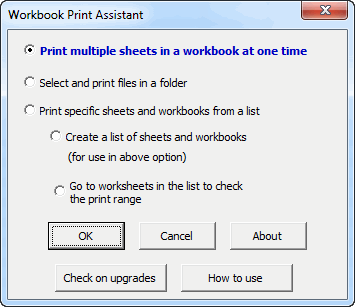
How to print multiple worksheets or workbooks.

The first option is for open workbooks.  It allows you to print any or all of the sheets in an open workbook.  One can select the sheet print order to get the printout in the order needed.

The other options are for printing multiple worksheets and workbooks.  The workbooks are automatically opened and closed as needed.

click to enlarge

The dialog to the right appears if one uses the option "Select files in a folder to print".  It allows one to selectively print sheets without opening the workbooks.  For example, you can print all sheets, just the first sheet, or specify filters to indicate sheets to print or not to print.

If you want to be more selective on the sheets to print, then use the option "Print specific sheets and workbooks from a list" found on the main dialog above.

To use the "Print specific sheets and workbooks from a list" option, you would first use the option "Create a list of worksheets and workbooks".  This creates a worksheet listing the path to each workbook, the worksheets in it, their print areas, and the header and footers.  Chart sheets are also listed and can be printed.   The following shows a sample of what this workbook looks like. (columns for orientation, headers and footers are not shown). Once created, you can delete rows you do not need and arrange the rows in the order you want to do the printing.

To print specific sheets, just select the range containing the sheets you wish to print.

When you use the above options, you are then presented with the following option choices:

Print area options
   
Header and footer options

Lastly, a confirmation dialog appears.  When you click OK, all of your sheets are printed.  This is far easier than opening workbooks and going to each sheet to print.

Order online from our secure service. Get delivery in minutes and start saving time!

Add to shopping cart

  $29.95


Customers who viewed the Workbook Print Assistant also viewed:

 
  Backup Assistant
  Cell Color Assistant
  Column Navigator
  Copy Move Assistant
  Favorite Bookmarks

  File Assistant
  List Assistant
  Report Runner
  Sheet Navigator
  Spreadsheet Assistant

  Time Saving Solutions
  To Do List Assistant
  Word Shifter
  Workbook Print
                  Assistant


  Waterfall Chart Creator
  Colored Cells Assistant
  CSV File Creator
  Data Loader
  Duplicate Finder

  Lookup Assistant
  Macros Made Easy
  Macro Examples
  Password Assistant
  Spreadsheet Assistant

Recently Viewed


Home * About * Contact * Feedback * Upgrades * Money Back Guarantee * FAQ's
Download Information * Ordering Questions * Support
Product List * New Products * Products by Others * Excel Solutions

Copyright 2010 Add-ins.com LLC, all rights reserved.  Spreadsheet Assistant is a registered trademark of Add-ins.com LLC.
Microsoft, Excel and the Office logo are trademarks or registered trademarks of Microsoft Corporation in the United States and/or other countries.

