 |
|
Questions? E-mail us
or call us 302-584-1771, 8AM to 10PM U.S. East Coast Time 7 days a week
|


|
Text File Importer
|
The Text File Importer add-in for Microsoft Excel can quickly and easily import text files (CSV TXT PRN ASCII ....) containing over one million rows of data into Microsoft Excel. And, the Excel Import Wizard does not pop-up with the file is imported! It is compatible with Microsoft Excel 2010-2021 and Office 365.
| One of our customers discovered when he manually opened CSV files that the credit card numbers (12 digit numbers) had the last digit changed from its actual number (1, 2, 3...) to a zero by Excel! With the Text File Importer, he was able to open the CSV file without it being automatically converted to columns. He could then specify that the credit card number was a text entry, and the zero was not dropped! |
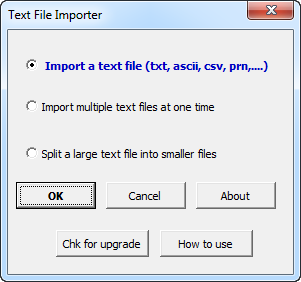
The Text File Importer is entirely menu driven. The following is the main dialog:
|
Order online from our secure service. |
|
US $19.95 |

| Copyright 2024 Add-ins.com LLC, all rights reserved. Spreadsheet Assistant is a registered trademark of Add-ins.com LLC. |