 |
|
Questions? E-mail us
or call us 302-584-1771, 8AM to 10PM U.S. East Coast Time 7 days a week
|


|
Address Assistant
|
Screen shots: 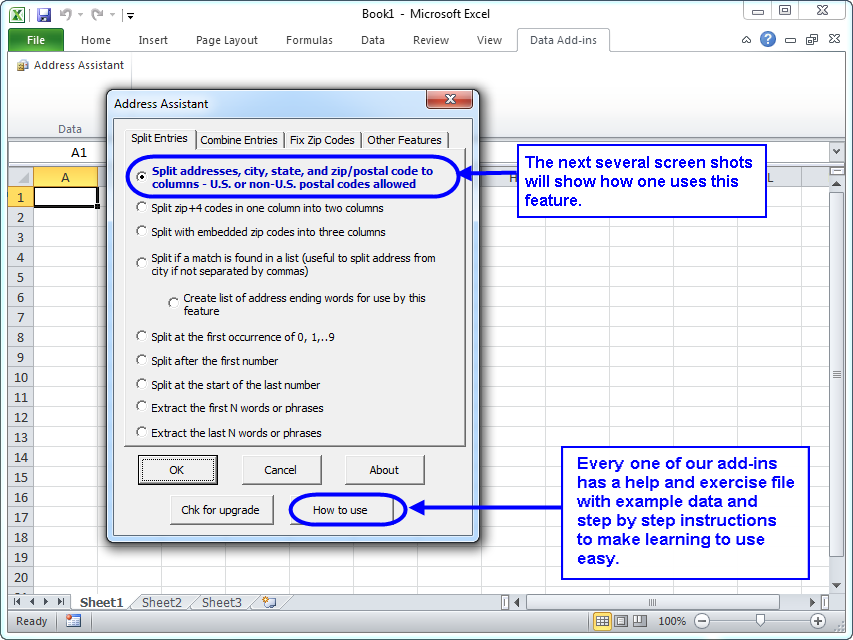 |
The Address Assistant add-in for Microsoft Excel helps you split cells containing street addresses, cities, states, and zip codes into multiple columns. It is compatible with Microsoft Excel 2013-2024 and Office 365.
| Jack Johnston wrote: "The address assistant is amazing. I converted 275 addresses that were in single column to individual columns in about 10 seconds-Fantastic app" |
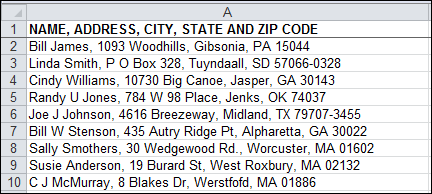
The following shows addresses before being processed by the Address Assistant and after being processed.
| Before: | After: | |
 |
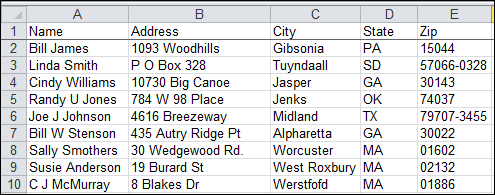 |
In the example above, we could have split the zip code into two columns: One for the 5 digit code and one for the 4 digit code. The Address Assistant can easily handle none-US postal codes like LU1 3LU or TW20 9QD. If there had been multiple addresses, like 10 Main Street, Apartment 2, these would have been split into two columns. The Address Assistant can recombine multiple columns (for example multiple address columns) back into a single column.
One very useful feature of the Address Assistant is the feature that adds leading zeros to zip codes. This feature is very useful when one imports addresses into an Excel worksheet and Excel converts zip codes like 02305 to 2305 dropping the leading zero! And if you need to export the zip codes to a CSV file, you may need to add a special space character to prevent leading zeros from being dropped when imported in another program.
Another feature can split zip+4 code entries in a cell into separate cells.
If you want to try a copy before purchasing, download a trial version now!
Another customer testimonial:
Linda Clark wrote: "I have bought a fair amount of software over the years, but I have never received the level of customer service as I did when I bought Address Assistant! I was working on converting an Excel file that I received from a client off of their proprietary software; I needed it to be in compatible fields for the software I was going to import it into. First, I bought the Name Splitter software, but soon ran into trouble. I contacted Mr. Flanagan at Add-ins.com. He asked if I could send a sample of the file for him to test. I did so, and explained how I needed to reconfigure it. He tested it out, and informed me that I would need to upgrade to Address Assistant. He gave me a full refund on the Name Splitter software, and walked me through, step by step, on the process for using the Address Assistant to achieve exactly what I needed. In total, I converted 1,642 contacts (names & addresses). The extra beauty of this software was that it pointed out addresses that were lacking zip codes. I cleaned these up, and my client was thrilled. I cannot say enough for the extra care and service I got -- as well as an excellent product! I will not hesitate to avail myself of further products as my needs grow. This company and its products and customer service are the best! |
|
Order online from our secure service. |
|
US $29.95 |

Customers who viewed the Address Assistant also viewed:
- CSV File Creator - Create CSV files the easy way.
- Duplicate Finder & Deleter - Quickly find and remove duplicates in one list or between two lists.
- Data Cleaner - Eliminate tedious manual cleaning of data
- Name Splitter - Easily split names into individual cell entries.!
- Word Shifter - Shift words from one cell to the next with just the click of a button.
| Copyright 2026 Add-ins.com LLC, all rights reserved. Spreadsheet Assistant is a registered trademark of Add-ins.com LLC. |