 |
|
Questions? E-mail us
or call us 302-584-1771, 8AM to 10PM U.S. East Coast Time 7 days a week
|


|
Duplicate Finder & Deleter
|
||
Screen shots: 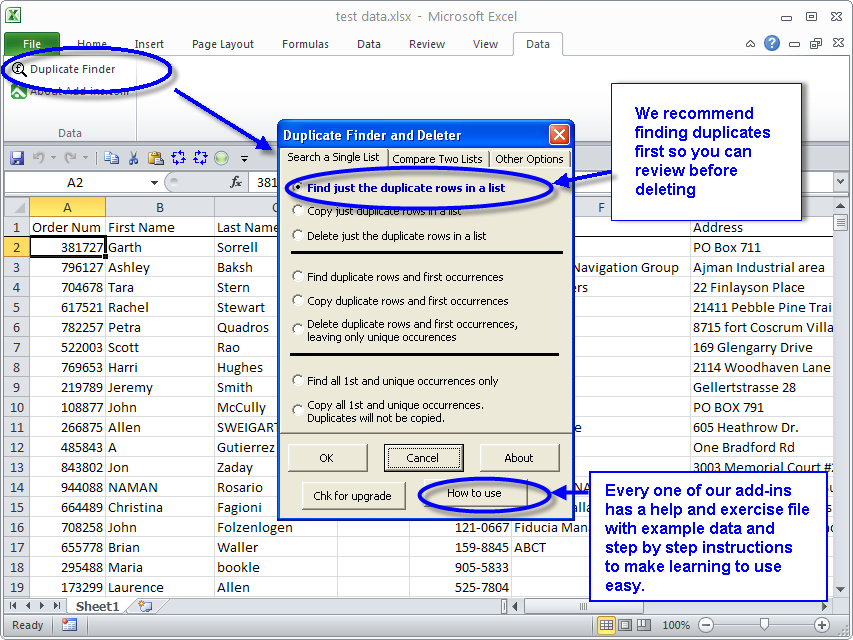 |
The Duplicate Finder & Deleter add-in for Microsoft Excel can quickly and easily find and delete duplicates based on entries in multiple cells. It is compatible with Microsoft Excel 2013-2024 and Office 365.
| Michael Fisher wrote regarding the Duplicate Finder & Deleter: "It was very good speaking with you this afternoon. I certainly appreciate your understanding about my system having crashed earlier and appreciate your consideration in posting me a web link for a subsequent download. I just downloaded the application and will immediately install it. If you would like a testimonial consider this: Duplicate Finder & Deleter is an essential add-in for anyone working with large data sets especially those assembled by mortals. Thank you again Michael" |
The Duplicate Finder & Deleter can easily handle over hundreds of thousands of rows. It is completely menu driven and very fast. The Duplicate Finder & Deleter is feature rich and easy to use. If you want to try a fully functional copy before purchasing, download a trial version now!
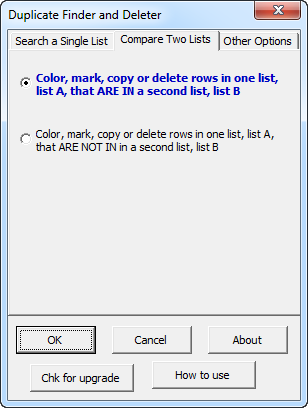
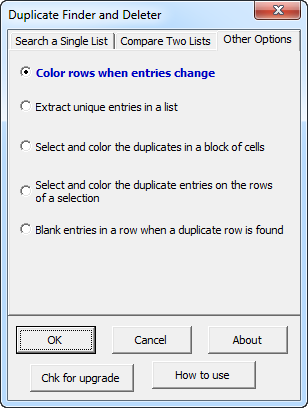
The picture on the right shows the Dupicate Finder's main dialog and its options. The options on the first tab is for one list where you want to find or delete duplicates in a list. The second tab is for comparing two lists. You can use it to find rows in one list that are in another list or to find rows in one list that are not in another list. The third tab:
|
|||||||||||||||||||||||||||

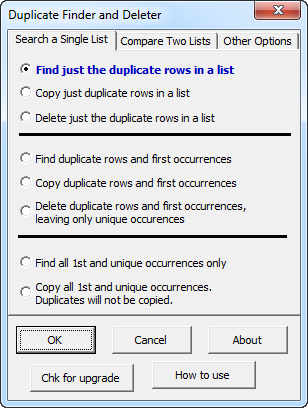
Our preferred approach is to first use the Duplicate Finder and Deleter to first search and find duplicates so we can confirm they are the duplicates we want to delete. Then run a second time to delete the duplicates.
More Customer Testimonials:
Anji Taylor wrote regarding the Duplicate Finder & Deleter: "Yesterday I purchased your de-dupe product, and wanted to let you know that it worked brilliantly to save me a ton of time on a deadline. You might be interested to know that I had originally downloaded the DigiDB dedupe product for evaluation - but could never get the trial to work properly nor could I get anyone at the company to address my tech support issues. I didn't buy, as I couldn't figure out if the product would work for my needs. I turned to your product, which was easy to download, install and use. Thank you.
Danielle Doctorow wrote: "Your Duplicate Finder & Deleter product worked great. We were able to edit a huge mailing list and save postage and printing costs for a fundraiser not to mention avoiding irritating current and potential funders! I think I mentioned when we spoke that I base my purchases on the support available and I am delighted to have purchased your product."
Dena Granderson wrote: "I just wanted to say our company purchased the duplicate finder product and it works great with our circulation deparment. Add-Ins offers not only outstanding products but also outstanding customer service. This company continues to improve on the quality of their products and they care about your satifaction. I am grateful that this company exists and it has made my life much easier at work, so I recommend this company to anyone that is in need of good service and products that will make your working experience easier and successful. "
John Worner wrote: "Really good job on the duplicate finder update for cells. It made it possible for me to complete some of my metrics in time for the VP of Eng to review before presenting his case to committee. If word of mouth advertisement is of value, then you have my backing. "
Daniel D. wrote: "Your Duplicate Finder product worked great. We were able to edit a huge mailing list and save postage and printing costs for a fundraiser not to mention avoiding irritating current and potential funders! I think I mentioned when we spoke that I base my purchases on the support available and I am delighted to have purchased your product."
|
Order online from our secure service. Get delivery in minutes! |
|
US $24.95 |

Customers who viewed the Duplicate Finder & Deleter also viewed:
- Data Cleaner - Eliminate tedious manual editing of data
- Address Assistant - Easily split addresses in one cell into multiple cells. Fix zip codes needing leading zeros.
- Name Splitter - Easily split names into individual cell entries.
| Copyright 2026 Add-ins.com LLC, all rights reserved. Spreadsheet Assistant is a registered trademark of Add-ins.com LLC. |