 |
|
Questions? E-mail us
or call us 302-584-1771, 8AM to 10PM U.S. East Coast Time 7 days a week
|


|
Unique Extractor
|
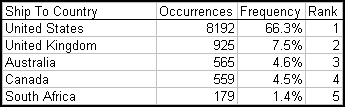
The Unique Extractor add-in for Microsoft Excel quickly and easily determines the number of occurrences, frequency and rank of the entries in a column or a selection of a column. An add-in product for Microsoft Excel
The following is an analysis of a column of data:
In addition to doing the above analysis, the Unique Extractor can extract rows from a worksheet based on an IF test. Just select the range to be searched and then fill in the following dialog. Options allow one to enter in a search entry or to specify a set of cells whose values will be used to do the search.
With the Unique Extractor, you can quickly extract the data of interest and spend time working on it instead of searching for it.
|
Order online from our secure service. |
|
US $19.95 |

Customers who viewed the Unique Extractor also viewed:
- Address Assistant - Easily split addresses in one cell into multiple cells. Fix zip codes needing leading zeros.
- CSV File Creator - Create CSV files the easy way, without warning messages.
- Data Cleaner - Eliminate tedious manual cleaning of data
- Duplicate Finder & Deleter - Quickly find and remove duplicates in one list or between two lists.
- Text File Importer - Import ASCII or text files with over a million lines!
| Copyright 2024 Add-ins.com LLC, all rights reserved. Spreadsheet Assistant is a registered trademark of Add-ins.com LLC. |