 |
|
Questions? E-mail us
or call us 302-584-1771, 8AM to 10PM U.S. East Coast Time 7 days a week
|


|
Word Shifter
|
Screen shots:  |
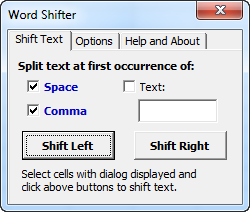
When cells are shifted, you can join the new words to the destination cells using a space, a comma or any text you insert in the text box. Thus you can use the separator text you need with a simple click.
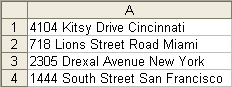
The following illustrates the result of using the Word Shifter to fix the following data:
| Before: | After: | |
 |
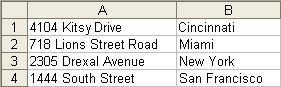 |
The shift of the words was done in just a few seconds for hundreds of rows of data.
|
Order online from our secure service. |
|
US $19.95 |

Customers who viewed the Word Shifter also viewed:
- Address Assistant - Easily split addresses in one cell into multiple cells. Fix zip codes needing leading zeros.
- Data Cleaner - Eliminate tedious manual cleaning of data
- Duplicate Finder & Deleter - Quickly find and remove duplicates in one list or between two lists.
- Text File Importer - Import ASCII or text files with over a million lines!
| Copyright 2026 Add-ins.com LLC, all rights reserved. Spreadsheet Assistant is a registered trademark of Add-ins.com LLC. |