 |
|
Questions? E-mail us
or call us 302-584-1771, 8AM to 10PM U.S. East Coast Time 7 days a week
|


|
Sheet Navigator
|
The Sheet Navigator add-in for Microsoft Excel makes moving from sheet to sheet easy and fast! It is compatible with Microsoft Excel 2010-2021 and Office 365.
With the click of a button a dialog like the following displays a list of all the sheets in a workbook:
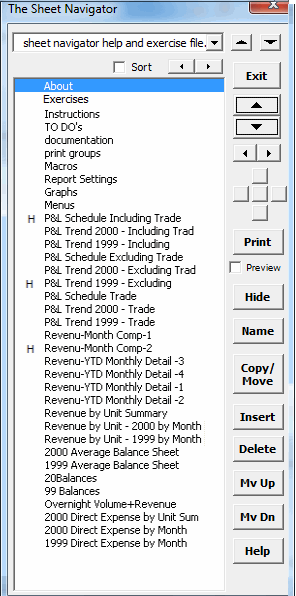
The "H" besides a sheet name indicates it is hidden. To unhide a hidden sheet, just click on it! To re-hide, select it and click the Hide button.
You can easily:
- Go to any sheet by just clicking on it in the list
- Rename sheets
- Delete sheets
- Copy (duplicate) sheets
- Hide or Un-hide sheets. The hide feature gives you two options: A normal hide which allows one to unhide the sheet by Format Unhide. And a very hidden option where the sheet is not visible if one does Format/Sheet Hide. Hiding a sheet as very hidden is a great way to keep data protected.
- Rearrange the sheets by moving them up or down
- Insert new sheets
The top dropdown buttons allow you to change from sheet
to sheet. The large spinner buttons allow you to go from sheet to sheet
with just a click. The small spinner buttons change the zoom setting
of the sheet. And the five small buttons allow you to scroll around
the sheet.
|
Order online from our secure service. |
|
US $19.95 |

Customers who viewed the Sheet Navigator also viewed:
- Cell Color Assistant - Create your own toolbar of buttons to quickly and easily format cells and rows.
- Password Assistant - Easily lock and unlock worksheets.
- Spreadsheet Assistant - Add over 200 time saving features to Excel.
- Row Extractor - Extract rows of data into columns for easy review and printing.
| Copyright 2024 Add-ins.com LLC, all rights reserved. Spreadsheet Assistant is a registered trademark of Add-ins.com LLC. |