 |
|
Questions? E-mail us
or call us 302-584-1771, 8AM to 10PM U.S. East Coast Time 7 days a week
|


 |
Password
Assistant
|
The Password Assistant add-in for Microsoft Excel allows you to password protect or password un-protect multiple worksheets at the same time with the same password. The Password Assistant cannot recover lost passwords to worksheets or to workbooks.
The Password Assistant is completely menu driven:
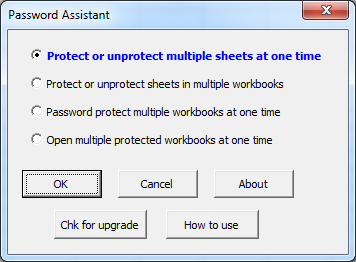
The menus are easy to follow and use. And to help you learn how to use the features of the Password Assistant there is a help and exercise file to give you hands on practice.
|
Order online from our secure service. |
|
US $29.95 |

Customers who viewed the Password Assistant also viewed:
- Sheet Navigator - Move from sheet to sheet with great ease. View a list of all your sheets with one click!
| Copyright 2024 Add-ins.com LLC, all rights reserved. Spreadsheet Assistant is a registered trademark of Add-ins.com LLC. |