 |
|
Questions? E-mail us
or call us 302-584-1771, 8AM to 10PM U.S. East Coast Time 7 days a week
|


|
Row Extractor
|
The Row Extractor add-in for Microsoft Excel quickly and easily converts the data on a row of data into a column of data. This makes it easy to view or printout. It is compatible with Microsoft Excel 2010-2021 and Office 365.
To use, just select cells on one or more rows (yes multiple rows are allowed, set the options you want and you end up with the data extracted to columns where it is easy to view. For example, if you wanted to see the data on the following worksheet for row 4:
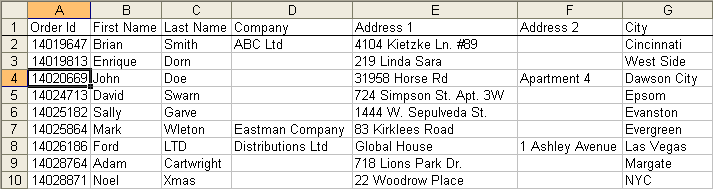
The Row Extractor easily extracts them to another worksheet (we've truncated the image to show just a sample of the extraction):
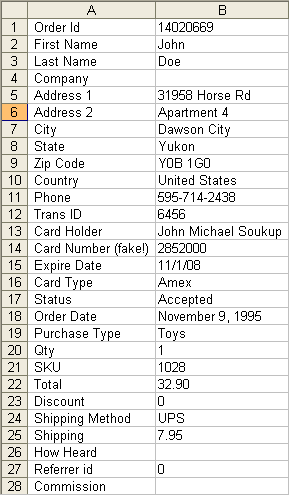
You may select one row or multiple rows and have the data extracted.
|
Order online from our secure service. |
|
US $19.95 |

Customers who viewed the Row Extractor also viewed:
- Backup Assistant - Automatically backup files when you open them and before you modify them (or back them up at your convenience).
- Cell Color Assistant - Create your own toolbar of buttons to quickly and easily format cells and rows.
- Column Navigator - Quickly and easily find and go to any column on a worksheet via a descriptive list of all the columns!
- File Assistant - See a list of the past 100 files you have opened! Easily re-open any file.
- Sheet Navigator - Move from sheet to sheet with great ease. View a list of all your sheets with one click!
- Spreadsheet Assistant - Add over 200 time saving features to Excel.
| Copyright 2024 Add-ins.com LLC, all rights reserved. Spreadsheet Assistant is a registered trademark of Add-ins.com LLC. |