 |
|
Questions? E-mail us
or call us 302-584-1771, 8AM to 10PM U.S. East Coast Time 7 days a week
|


|
Sensitivity Analyzer
|
The Sensitivity Analyzer add-in for Microsoft Excel performs "what if" analysis quickly and easily, and saves you a lot of time. It is compatible with Microsoft Excel 2010-2021 and Office 365.
The Sensitivity Analyzer add-in allows you to vary the data in up to five cells and return the values of up to ten other cells. You can specify the starting, stopping, and step values for each of the five cells. It automatically creates a report containing the information on all the cases. It does the calculations and data processing far faster than you can manually, saving you time and eliminating the pain of doing many cases manually. And it puts the original data back in the worksheet cells when it is done processing the cases! It automatically creates a report containing the information on all the cases.
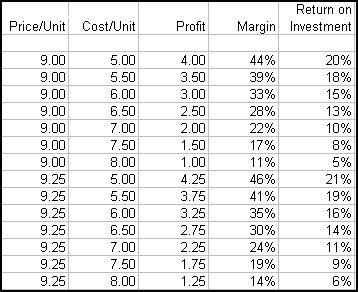
The following illustrates just such a report, where price and cost per unit has been varied to see the effect on profit, margin and return on investment::
|
Order online from our secure service. |
|
US $19.95 |

Customers who viewed the Sensitivity Analyzer also viewed:
- Multi-Cell Goal Seeker - Do goal seek on multiple cells automatically.
- Risk Analyzer - Do decision and risk analysis the easy way.
- Sensitivity Chart Creator - Easily create sensitivity or tornado charts.
| Copyright 2024 Add-ins.com LLC, all rights reserved. Spreadsheet Assistant is a registered trademark of Add-ins.com LLC. |