 |
|
Questions? E-mail us
or call us 302-584-1771, 8AM to 10PM U.S. East Coast Time 7 days a week
|


Backup Assistant
|
The Backup Assistant add-in for Microsoft Excel is designed to help you make backup copies of your workbooks before you make changes to them. One of its most useful features is to prompt you to backup a file immediately after it is opened! It is compatible with Microsoft Excel 2010-2021 and Office 365.
Eliminate the worry about messing up a file and not having an up-to-date backup.
One of the college students working for us, Sarah, put a copy of the Backup Assistant on her computer. She had it set to backup files once a day, upon opening. At the end of summer, she returned to school. Near the end of the Fall semister, she let one of her workgroup work on their excel project workbook that was on her PC. He ended up totally trashing the file. They thought that all was lost and they would fail the semister project as a result as the PC had not been backed up.. Then Sarah realized she still had the Backup Assistant running in Excel, automatically backing up files once a day when they were opened. She quickly opened the backup that was made that day and found that they had not lost their work after all! |
To use, just click the Backup Assistant button to display the following dialog:
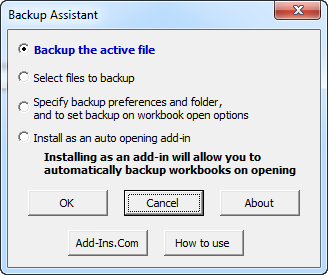
The first two options allow you to either backup the active file or to backup a group of files. The third group option allows you to set backup preferences and on workbook open options. Backup on open is a very powerful feature. We use it to backup all of our workbooks when they are first opened each day. The backups are saved to a target folder with the file name and the date. For example, "Sales Data 2010 09 23.xls".
The third option displays a dialog that allow you to:
- Specify if files are to be backed up on opening
- The backup frequency: daily, each time opened, after confirmation, or not at all.
- The backup folder
- The naming convention for the backup files
- File types to be excluded. For example one can exclude CSV files, which are frequently opened but are not needed to be backed up. Or exclude all files from a temp folder
The Backup Assistant is completely menu driven. The menus are easy to follow and use. To help you learn how to use the features of the Backup Assistant, there is a help and exercise file to give you hands on practice. To open it, just click on the How to use button on the main dialog.
|
Order online from our secure service. |
|
US $19.95 |

Customers who viewed the Backup Assistant also viewed:
- Column Navigator - Quickly and easily find and go to any column on a worksheet via a descriptive list of all the columns!
- File Assistant - See a list of the past 100 files you have opened! Easily re-open any file.
- Row Extractor - Extract rows of data into columns for easy review and printing.
- Sheet Navigator - Move from sheet to sheet with great ease. View a list of all your sheets with one click!
- Spreadsheet Assistant - Add over 200 time saving features to Excel.
| Copyright 2024 Add-ins.com LLC, all rights reserved. Spreadsheet Assistant is a registered trademark of Add-ins.com LLC. |