 |
|
Questions? E-mail us
or call us 302-584-1771, 8AM to 10PM U.S. East Coast Time 7 days a week
|


Comments Assistant
|
The Comment Assistant add-in for Microsoft Excel makes using comments on Microsoft Excel worksheets very easy. It is compatible with Microsoft Excel 2010-2021 and Office 365.
The Comments Assistant has the following features:
 |
 |
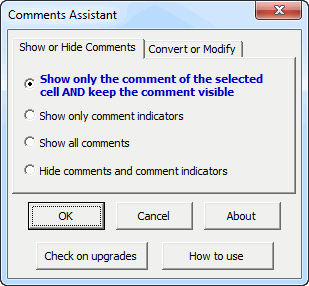
The first option on the Show or Hide Comments tab makes the comment of the selected cell always visible. The Excel setting when comment indicators are visible is to only show a comment when you hover the mouse over it. By having it displayed all the time the cell is selected, it is easier to read, and you can just click into it to edit it.
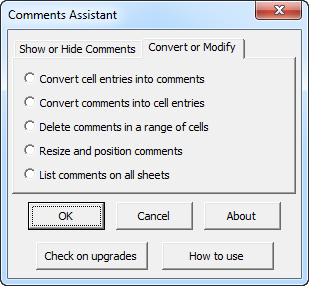
The features to convert cell entries to comments or to convert them back is very useful. One can convert to cell entries, easily edit, print, and then convert back to comments.
The feature "Resize and position comments" found on the second tab handles the problem of cell comments getting moved far away from their parent cell. With just a click, the comments are resized and repositioned next to their cells
Order online from our secure service. |
|
US $19.95 |

Customers who viewed the Comments Assistant also viewed:
- Copy Move Assistant - Copy or move rows between worksheets with just a single click!
- List Assistant - Effortlessly re-arrange rows and cells.
- Spreadsheet Assistant - Add over 200 time saving features to Excel.
| Copyright 2024 Add-ins.com LLC, all rights reserved. Spreadsheet Assistant is a registered trademark of Add-ins.com LLC. |