 |
|
Questions? E-mail us
or call us 302-584-1771, 8AM to 10PM U.S. East Coast Time 7 days a week
|


|
Copy Move Assistant
|
The Copy Move Assistant add-in for Microsoft Excel makes it easy to move or copy rows between worksheets. It is compatible with Microsoft Excel 2010-2021 and Office 365. No more selecting a row, copying, going to another worksheet, pasting, and then returning to the source worksheet!
To use the Copy Move Assistant just select the rows to move or copy, select the option you wnat (copy or move) and click the Copy or Move button to complete the action.
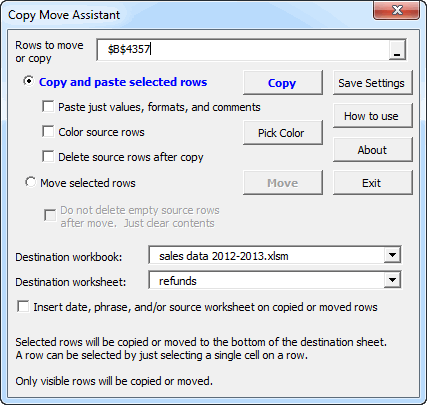
One you have specified your settings, the Copy Move Assistant will remember them from Excel session to Excel session. And, it stores the settings for up to 50 workbooks to make it easy to change settings.
|
Order online from our secure service. |
|
US $19.95 |

| Copyright 2024 Add-ins.com LLC, all rights reserved. Spreadsheet Assistant is a registered trademark of Add-ins.com LLC. |