 |
|
Questions? E-mail us
or call us 302-584-1771, 8AM to 10PM U.S. East Coast Time 7 days a week
|


|
Random Sampler
|
Screen shots: 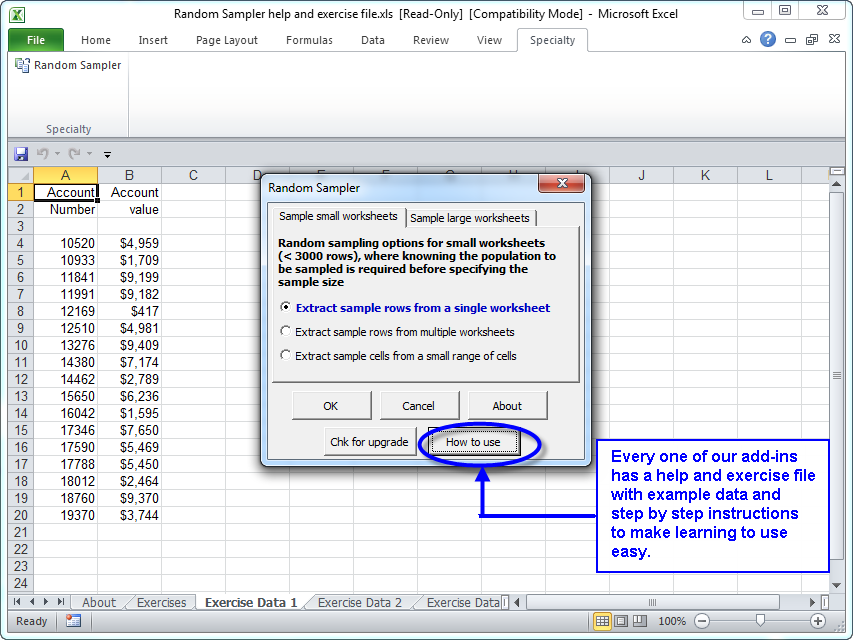 |
The Random Sampler a great tool for anyone who must create random samples. It can be used to select a random sample from a list of employees,invoices, accounts, orders, or anything.
It is menu driven and easy to use. You just select your list in the Excel worksheet and tell it how many samples to extract. You can exclude from the samples rows that have already been sampled. Or you can exclude from sampling if there is an entry in a particular columnl or if the row is colored. This makes it very easy to create a new sample list and not include previously sampled data.
The following illustrates samples of an invoice worksheet, where the sample rows have both been colored and have had a date inserted in column I indicating that the row was sampled and when.:
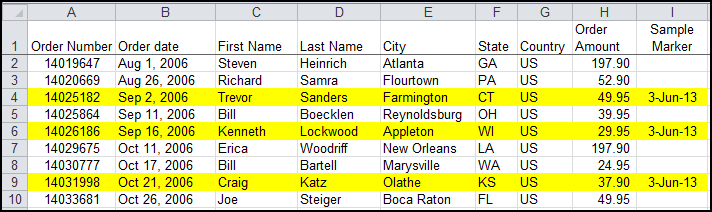
The Random Sampler provides two ways to document that your samples came from using the Random Sampler:
- Image files of the sample rows can be created. These image files have a special watermark to make it difficult to modify:
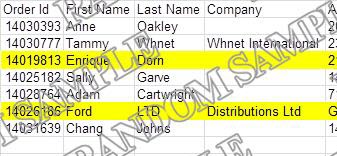
- One can specify the seed for the random sampling. By specifying a seed value, one can share the seed value with another (such as an independent auditor), who can duplicate the identical sample from the data using his/her copy of the Random Sampler.
The following are just some of the features of the Random Sampler:
- Exclude rows if previously sampled
- Sample only rows that meet a sampling criteria, like sampling only invoices over $1000
- Extract samples across multiple worksheets
- Use a random seed you specify so that the sampling can be duplicated by others
- Create image files of the random samples - Image files contain watermarks
|
Order online from our secure service. |
|
US $49.95 |

Customers who looked at the Random Sampler also looked at:
- Random Number Generator - Random numbers the easy way.
| Copyright 2026 Add-ins.com LLC, all rights reserved. Spreadsheet Assistant is a registered trademark of Add-ins.com LLC. |