 |
|
Questions? E-mail us
or call us 302-584-1771, 8AM to 10PM U.S. East Coast Time 7 days a week
|


|
To Do List Assistant
|
The To Do List Assistant add-in for Microsoft Excel is a feature rich way to manage your to do lists. An add-in product for Microsoft Excel
The To Do List Assistant allows you to construct to do worksheets that are the way you want them. You can completely customize your to do list worksheets. The to do list worksheets can be kept in any file and/or in workbooks dedicated to to do lists. You can have as many to do worksheets and to do workbooks as you want.
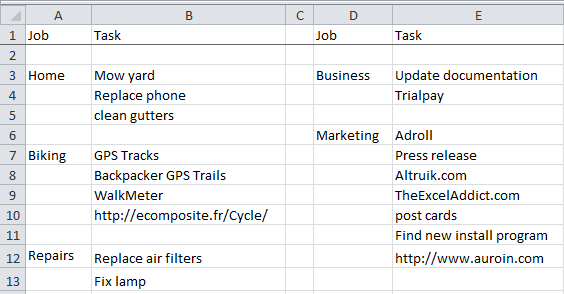
The following is a picture of a very simple to do list:
The following are a list of many of the To Do List Assistant's features:
-
Quickly open and display your default to do list workbook
-
Create new to do list worksheets by using any of the templates that come with the To Do List Assistant
-
Archive (store) completed tasks quickly and easily
-
Easily move tasks up or down to arrange in order of importance
-
Automatically open your default to do workbook whenever Excel opens
-
Extract colored cells from multiple sheets - Very useful if you have multiple to do worksheets and have colored the top priority ones on each sheet.
The last feature above is one of our newest and is one of our most useful ones. We have found that we have multiple to do lists and we are are constantly going to each list and trying to decide what to work on. Each of our list has the top priority jobs color coded. However, we could never easily see all the top priority jobs as they are on different sheets. We tried to solve by creating a "top priority" worksheet and copying the top priority jobs from each worksheet to this sheet. However, maintaining the top priority list manually was a pain, as the priorities on each sheet changed over time. So, we added the extract color cells feature to automate this task. And to make it more useful, we added an option to it to check to see if the extracted cell was already in the list. If it was it would not copy it to our top priority list. And if the top priority list no longer had an entry, that entry was cross through so we know it was done or changed.
The last feature we added to make managing to do's easy was to add a feature that automatically opens our default to do workbook whenever Excel opens. This way, we always see our to do workbook when we open Excel. It makes it kind of difficult to avoid looking at what you need to do!
|
Order online from our secure service. |
|
US $19.95 |

| Copyright 2024 Add-ins.com LLC, all rights reserved. Spreadsheet Assistant is a registered trademark of Add-ins.com LLC. |