 |
|
Questions? E-mail us
or call us 302-584-1771, 8AM to 10PM U.S. East Coast Time 7 days a week
|


|
Loan Assistant
|
The Loan Assistant add-in for Microsoft Excel is a full featured financial tool for managing and understanding loans. It is compatible with Microsoft Excel 2013-2024 and Office 365.
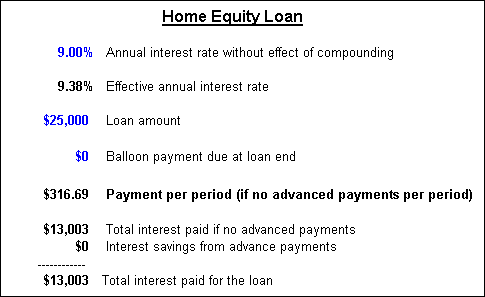
The following is part of the loan summary information of a new loan. You may change any blue entry on this page to see alternative results:
The following is a summary table that shows loan detail by year:
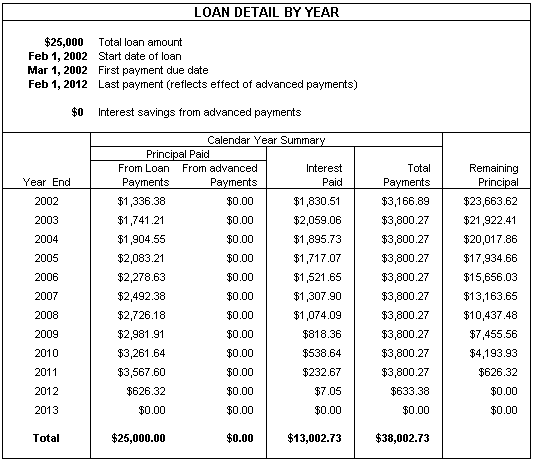
To see the detail by pay period view the PDF file loan detail.pdf
With the Loan Assistant, you will know in advance what your loan payments will be for any loan. It also generates amortization tables showing the amount of principal, unpaid balance, and interest by week month or year. Easily change information on your loan and see the results instantly. See the effect of making early payments on the interest and loan payments.
The Loan Assistant also lets you track principal and interest payments on existing loans. This feature allows you to:
-
Enter the date and amount of each payment
-
Prorate the interest for the initial month of the loan based on the day that interest starts
-
Add additional borrowings in any month and prorate the interest in the first month on these borrowings
-
Get detail reports for all years of the loan or on any year of the loan. The reports show the interest charged, the interest paid, the beginning and ending balances by month, what payments have been made, and how much of the payments is for interest and for principal.
-
Loans can start any time not just the 1st of the year. Payments can be delayed for months or years from the start of the loan.
-
View PDF's of the reports:
For new loans the Loan Assistant creates a detailed Excel workbook that contains:
- payment schedules
- interest amortization tables
- annual interest and principal amounts
- and graphs of the loan payments
You can change any of the loan assumptions and immediately see the impact. You can also enter advanced payments and one time irregular payments and see how much interest you save by doing so.
In addition to the above there is a detailed worksheet that shows the following information by payment period:
- Payment date
- Payment number
- Payment amount and amount that is for principal and for interest
- Advanced payments - which can be entered on any frequency you wish
- Unpaid balance
- Cumulative principal payments
- Cumulative interest payments
- Cumulative total payments
There are also loan charts that show:
- Cumulative principal payments by year
- Interest by year
- Cumulative interest by year
|
Order online from our secure service. |
|
US $19.95 |

| Copyright 2026 Add-ins.com LLC, all rights reserved. Spreadsheet Assistant is a registered trademark of Add-ins.com LLC. |