 |
|
Questions? E-mail us
or call us 302-584-1771, 8AM to 10PM U.S. East Coast Time 7 days a week
|

Flash Card Assistant Free! Download now! No purchase required!
|
The Flash Card Assistant add-in for Microsoft Excel is an easy way to construct and display flash cards. It is compatible with Microsoft Excel 2013-2024 and Office 365.
The Flash Card Assistant is a free program. No purchase ever required. No restrictions.
One can construct flash cards very easily in Excel. Just enter the questions in one column and the answer in another:
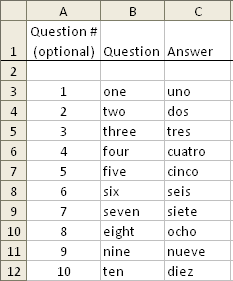
You have options to:
- Display either the question or answer first
- Show in random order, first to last, or last to first
- Mark questions or answers as known so that they can be excluded from viewing sessions
- Display questions even if marked as known
- Display only questions on selected rows
- Show questions and answers in different font sizes, bolded and centered.
- Slide show capability
- Add hints!
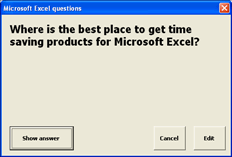
The following shows the front and back of a flash card:
| Front | Back | |
|---|---|---|
 |
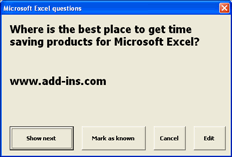 |
As you can see, it is identical to how physical flash cards work: you look at one side and see a question, and then the other side to see the answer. You can also have it display the answer first and see if you know the question.
The main dialog of the Flash Card Assistant gives options to
- Number your questions,
- Randomize the list,
- Sort your list back in question number order,
- Insert blanks every 10 rows,
You can create a new flash card list very easily. Just select the option on the main dialog titled "Create a new flash card worksheet". Then just fill in the questions and answers. You can share the lists with your friends by emailing the worksheet to them.
| Copyright 2026 Add-ins.com LLC, all rights reserved. Spreadsheet Assistant is a registered trademark of Add-ins.com LLC. |