Add-ins.com home page
Questions? E-mail us or call us 302-234-9857, 8AM to 10PM U.S. East Coast Time 7 days a week
 
Checkbook Assistant
A FREE add-in product for Microsoft Excel

FREE - Download Now - Release 2.22

  • No purchase ever required.
  • Easily create a checkbook register in Excel
  • Insert new entries with a single click
  • Move entries up and down to be in the same order as your bank's web page.

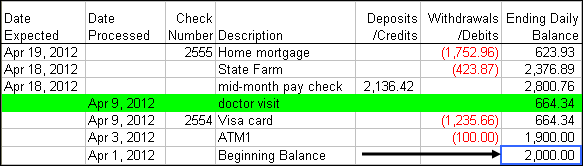
The Checkbook Assistant add-in for Microsoft Excel is an easy way to do your checkbooks and back statements in Excel.  The checkbook worksheet register is very simple:

You can add as many columns to the right for comments or other information as you need.

The order of the entries is the same as you find on a typical bank statement web page, with the latest transactions on the top.  The latest (top) processed row is automatically colored green. Transactions that have not been processed by the bank have an expected date and are placed above the processed transactions.

The Checkbook Assistant has a simple toolbar that helps you arrange the transactions in the same order as the bank statement web page:

The first two buttons allows one to move rows up or down.  The third button inserts new rows whenever needed.  The fourth button deletes rows.  The last button, the "C" button, displays a dialog that lets you create new checkbook worksheets and open your default checkbook workbook.  You can have as many checkbook worksheets and workbooks as you want.

When you use the insert button (the third button), if you select multiple rows, then that number of rows are inserted.  If you select a single row, then the following dialog appears to help you in inserting a new transaction:
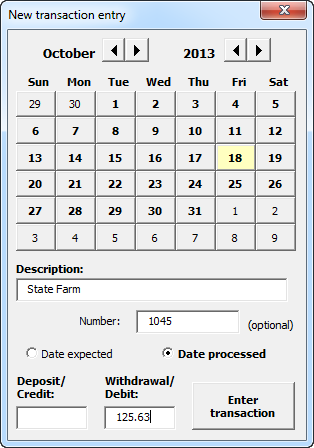
To balance your checkbook, just enter the transactions that your bank shows.  Then arrange them to be in the same order as the bank's web page.  If you use the option on your bank's web page to show the ending balance by transaction, then you can easily see if you and the bank are in balance.

One really neat feature of the Checkbook Assistant is the auto date arrangement feature.  When you enter a date in the Date Expected column or the Date Processed column, it will move the row to be in date order. 

Download Now - the Checkbook Assistant is free - no purchase required. Does not expire. 

Latest release: 2.22.  Release notes:

  • July 9, 2012 - Turned on the auto clear expected date for new users.  Previously, the default had been off.
  • May 2, 2012
    • Made the calendar dialog modeless so that one can leave it displayed and edit entries
    • Auto sets the date expected or date processed based on the date clicked
    • added a check number text box
    • Increased the speed of the calendar dialog appearing
  • April 30, 2012 - Modified so that user did not have to select a row in the transaction area when adding a entry via the calendar feature.
  • April 29, 2012 - Modified to insure new rows are default height.
  • April 21, 2012 - Modified so if auto arrange is on, all entries are put at the top and then arranged. This insures better arrangement results.
  • April 17, 2012
    • Added an option to auto clear expected date when processed date is entered
    • Added an option to auto change positive debit entries to negatives
  • April 16, 2012 - Added date selection dialog when adding a new entry
  • April 15, 2012 - Release 2.0


Quantity
Discounts

Order online
Immediate
delivery

Money back
guarantee


Copyright 2013 Add-ins.com LLC, all rights reserved.  Spreadsheet Assistant is a registered trademark of Add-ins.com LLC.