 |
|
Questions? E-mail us
or call us 302-584-1771, 8AM to 10PM U.S. East Coast Time 7 days a week
|


|
Merge Assistant
|
The Merge Assistant add-in for Microsoft Excel will combine entries in multiple cells into one cell. It is compatible with Microsoft Excel 2010-2021 and Office 365. The following is the main dialog:

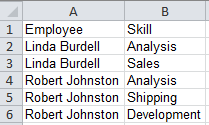
The first option allows you to merge entries on multiple rows into one row, as illustrated by the following:
| Before merging | After merging | |
 |
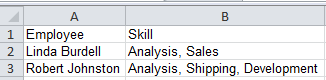 |
In the above, the entries in column B were merged and the duplicate rows deleted. Deletion of duplicate rows is an option.
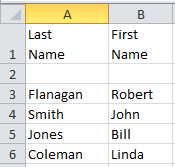
The following illustrates before and after screenshots if one uses the second option to meger cell entries:
| Before merging | After merging | |
 |
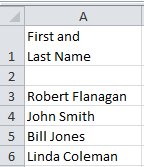 |
You can merge as many columns you want in any order you want. The text from the different cells can be separate with spaces, commas, or any of several other options.
The Merge Assistant is entirely menu driven.
|
Order online from our secure service. |
|
US $19.95 |

| Copyright 2024 Add-ins.com LLC, all rights reserved. Spreadsheet Assistant is a registered trademark of Add-ins.com LLC. |