 |
|
Questions? E-mail us
or call us 302-584-1771, 8AM to 10PM U.S. East Coast Time 7 days a week
|


Lookup Assistant
|
Screen shots:  |
The Lookup Assistant add-in for Microsoft Excel is designed to find or lookup matching data in one list and load in another. It is compatible with Microsoft Excel 2010-2021 and Office 365.
Regarding the Lookup Assistant, Mark Reid told us: "After 18 hours of wading through 6,000 lines of a 40,000 product database I had almost given up entirely. I then spent over an hour trying various programs that offered a quick fix for my problem but none of them met the exact criteria until I found Lookup Assistant - within 15 minutes of installing the add-in I had completed the database restructure! I can't thank you enough for this excellent addition to Excel!" Mark Babb who purchased the Lookup Assistant and Cell Color Assistant wrote: "Your products are WONDERFUL! I have used Excel since it was Lotus and Quattro <wink> and you have really made it easy to use the built-in functions with your clever front-ends. Thanks a ton!" |
If you have a price list of product numbers and prices in one worksheet and in an invoice worksheet you just have product numbers, the Lookup Assistant will match the numbers in the invoice to those in price list. You are given the option of either loading matching values, inserting a simple formulas (ex: =F23), or a VLOOKUP formula to the matching data.
The Lookup Assistant prompts you for the following information:
-
The cells containing the identifiers to be looked up. Multiple columns may be specified. The Lookup Assistant will concatenate the columns.
-
The data columns containing the data to be returned if there is a match on the IDs. Multiple columns can be specified
-
The identifiers for the data so that they can be searched for matches. Multiple columns can be specified.
-
The starting destination column for the matched data.
The following is the main dialog of the Lookup Assistant:
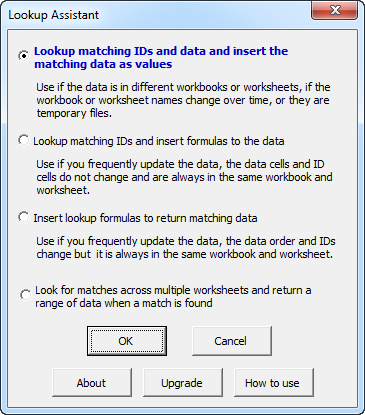
There are several options to assist you in determining what was loaded or not loaded.
- You can click on a checkbox that colors the loaded data green.
- You can click on a checkbox that colors IDs that were not matched.
- And you can have a text comment placed on the rows of the lookup values to indicate if a match was found or not.
The Lookup Assistant is fully menu driven and comes with a help file and an exercise file. The exercise file gives you step by step instructions to help you quickly learn how to use the Lookup Assistant.
We received the following testimonial after a customer asked if we could add a feature to the Lookup Assistant. (We had the feature in place in a day)
| Ryan McMenamin wrote: "I must say, I'm incredibly impressed by the speed by which you responded to our needs. You absolutely knocked it out of the park. I am very, very thankful." |
|
Order online from our secure service. |
|
US $24.95 |

Customers who viewed the Lookup Assistant also viewed:
- Column Navigator - Quickly and easily find and go to any column on a worksheet via a descriptive list of all the columns!
- Data Loader - Make Excel data loading easier.
- Duplicate Finder & Deleter - Quickly find and remove duplicates in one list or between two lists.
- Spreadsheet Assistant - Add over 200 time saving features to Excel.
- Row Extractor - Extract rows of data into columns for easy review and printing.
| Copyright 2024 Add-ins.com LLC, all rights reserved. Spreadsheet Assistant is a registered trademark of Add-ins.com LLC. |