 |
|
Questions? E-mail us
or call us 302-584-1771, 8AM to 10PM U.S. East Coast Time 7 days a week
|


|
Data Assistant
|
The Data Assistant add-in for Microsoft Excel helps you get your data into pivot tables the right way. It is compatible with Microsoft Excel 2010-2021 and Office 365.
| Michael Matza wrote: "Every time I use the Data Assistant, I give thanks for your work. Although all of your stuff is great, this has proven to be unique and valuable to me over the years." |
The Data Assistant converts data that is in table form into data that is usable for pivot tables. For example if your data looks like the following:
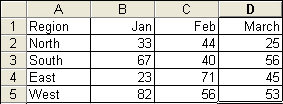
The Data Assistant will create a data table that looks like the following:
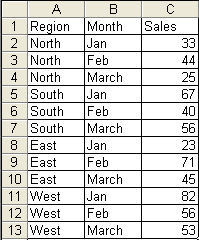
The original data is not modified - a new table is created. Data in the second format is the best format for pivot tables.
There is a help and exercise file that helps you learn how to use the Data Assistant. It is available by clicking on the button "Help/Exercise File" on the above dialog.
|
Order online from our secure service. |
|
US $19.95 |

| Copyright 2024 Add-ins.com LLC, all rights reserved. Spreadsheet Assistant is a registered trademark of Add-ins.com LLC. |