 |
|
Questions? E-mail us
or call us 302-584-1771, 8AM to 10PM U.S. East Coast Time 7 days a week
|


|
Conditional Format Assistant
|
The Conditional Format Assistant add-in for Microsoft Excel is designed to help you format cells based on hundreds of different conditional tests. It is compatible with Microsoft Excel 2010-2021 and Office 365.
The conditional tests are specified on a worksheet. The following illustrates such a worksheet:
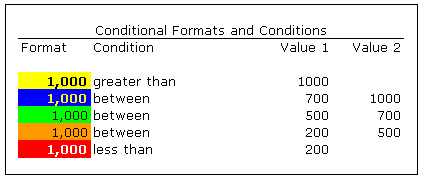
The following are the tests (numeric and text) that you can use:
- between
- not between
- equal to
- not equal to
- greater than
- less than
- greater than or equal to
- less than or equal to
- Is
- Contains
- Begins with
- Ends with
The Conditional Format Assistant main dialog has a menu item titled "Create a Conditional Format Assistant worksheet" that constructs a worksheet like the one illustrated above. When you click in a cell in the conditions column, a drop down appears that gives you the above test choices.
To format cells you would:
- Select the range of cells to be formatted
- Select the conditional format test rows from the above worksheet
- Click OK!
The Conditional Format Assistant comes with both a help file and an exercise file. The exercise file is the fastest and easiest way to learn to use the features of the Conditional Format Assistant.
The formatting done by the Conditional Format Assistant is not dynamic. If the values of formatted cells change, you will need to re-run the Conditional Format Assistant. Nor does it increase the number of format conditional tests found in Excel.
|
Order online from our secure service. |
|
US $24.95 |

| Copyright 2024 Add-ins.com LLC, all rights reserved. Spreadsheet Assistant is a registered trademark of Add-ins.com LLC. |