 |
|
Questions? E-mail us
or call us 302-584-1771, 8AM to 10PM U.S. East Coast Time 7 days a week
|


|
Colored Cells Assistant
|
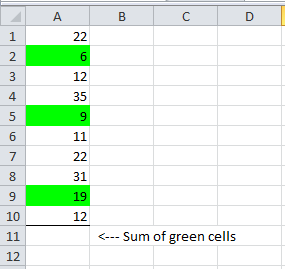
The Colored Cells Assistant add-in for Microsoft Excel adds the ability to write equations based on cell color. It is compatible with Microsoft Excel 2010-2021 and Office 365. The following screenshots illustrates the challenge and the solution:
| Before | After | |
 |
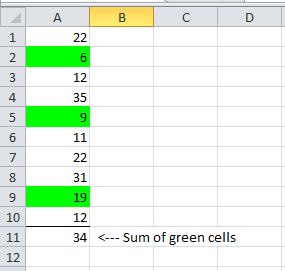 |
All we did was use the Colored Cells Assistant to insert a formula that sums just the green colored cells!
The Colored Cells Assistant will return just the cells with the color you indicate. For example, if you color some cells in a range with a yellow background you can use a Colored Cells Assistant function to return or sum just those cells. It can easily average, find the minimum or maximum, or the count colored cells. And you can use it with any of Excel's functions.
The Colored Cells Assistant is menu driven and creates the formulas you need
You can even set the background color option to be "colored" so that you can sum, average, count, etc cells that are yellow, blue, green, or any color except no fill. This allows you to color cells any way you want and still do computations on just the colored cells. You do not need to specify a color in this case!
The Colored Cells Assistant only recognizes cells colored using Excel color buttons or by selecting a color via Format, Cells. It does not recognize the color of cells formatted by conditional formatting.
If you send a workbook to another person and they do not have the Colored Cells Assistant, they will need to purchase a license to it in order for the Colored Cells Assistant functions to work for them.
|
Order online from our secure service. |
|
US $29.95 |

| Copyright 2024 Add-ins.com LLC, all rights reserved. Spreadsheet Assistant is a registered trademark of Add-ins.com LLC. |